Status View
Overview
The Status view provides a quick way to see if your Roadmap is missing any Estimates, Requirements, or Tasks. It helps teams identify gaps and ensure all Work Items are properly planned.
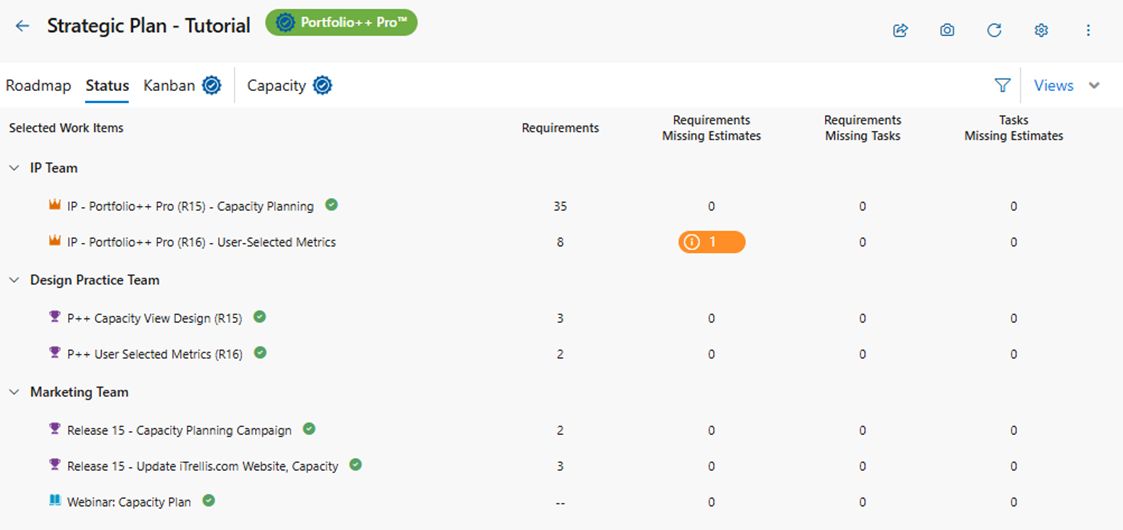
Selected Work Items
Displays the list of Projects, Teams, or Queries (based on Roadmap setup) along with their selected Work Items.
- Icon: Indicates the Work Item type.
- Name: Name on the Work Item title. Click to open the Work Item.
- Green Check Mark: Indicates that all requirements are present.
- Collapsible: Expand or collapse a parent item and its children using the arrow icon.
Requirements
Number of Work Items or PBIs under the current Work Item.
Note: For the following columns, an orange pill icon indicates something is missing. Clicking the orange icon opens a query page listing the affected items.
- Requirements Missing Estimates: Work Items or PBIs missing an Effort value (Story Points, Effort, Size).
- Requirements Missing Tasks: Work Items or PBIs missing child Tasks.
- Tasks Missing Estimates: Tasks missing an Effort value (Story Points, Effort, Size).