Roadmaps Directory
Overview
Use the Roadmaps page to view and manage your roadmaps in Portfolio++. From this page, you can create new roadmaps, access recently viewed roadmaps, search or filter existing roadmaps, and view key details such as the owner, type, and included items.
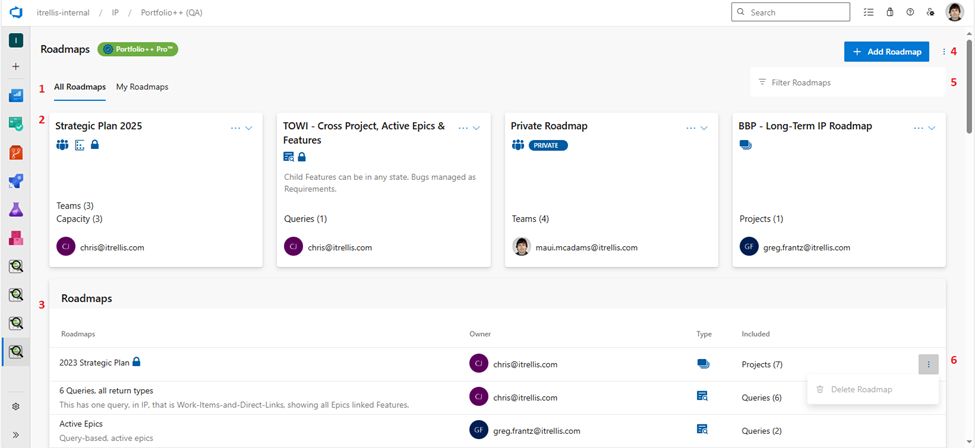
1. Roadmap Views
- All Roadmaps: Displays every roadmap except private ones owned by others.
- My Roadmaps: Displays only the roadmaps you created.
2. Recently Viewed
- Recently Viewed Roadmaps: Displays your most recently opened roadmaps for quick access.
3. Roadmap List
- Roadmaps: Name of the roadmap. A lock icon indicates it can only be edited by the owner.
- Owner: Displays the owner’s email and avatar.
- Type: Symbol indicating roadmap type (Project, Team, Query, or Capacity). Hover to see a description.
- Included: Shows the number of items included in the roadmap. Hover to view details.
4. Actions
- Add Roadmap: Create a new roadmap.
- Manage Subscription: If you have an active subscription that you own, click this to manage your subscription in Stripe or Azure.
5. Filtering
- Filter Roadmaps: Search by roadmap name, description, or owner’s email.
6. Deleting Roadmaps
- Delete Roadmap: Roadmap owners can delete their own roadmaps.
note
Admins can delete any roadmap from the Administration view.